
For years, Apple Silicon Macs have felt like a paradox in the professional AV industry.
On one side, they are absolute monsters when it comes to video playback and rendering performance. Modern Macs can easily compete with the biggest high-end media servers on the market. In many scenarios, they even outperform them.
An M4 Max can push insane amounts of real-time playback — up to 16 simultaneous 8K60 streams in ProRes and NotchLC. An M2 Ultra goes even further, handling 22-26 simultaneous 8K streams without falling apart.
And honestly, this level of performance is almost impossible to find in traditional media server architectures.
Why?
Because most media servers eventually hit bottlenecks somewhere between storage bandwidth, CPU transfers, GPU uploads, or PCIe limitations. Apple Silicon largely avoids these problems because of its unified memory architecture and absurd internal bandwidth.
The rendering power is there. The playback power is there. The efficiency is there.
But Apple forgot one very important thing.
Professional synchronized outputs.
No proper frame sync. No true genlocked display outputs. No elegant way to drive gigantic custom LED canvases.
And in the Pro AV world, that changes everything.
Yes, there are EDID hacks. Yes, tiled displays can work. Yes, DisplayPort 1.4 and HDMI 2.1 can theoretically do incredible things.
But in reality, most professional LED processors and video systems either do not support these workflows properly or introduce other painful limitations.
So the entire setup process becomes fragile, complicated, and honestly… not very professional.
The usual compromises
Then there are SDI-based solutions like Blackmagic DeckLink cards.
But they come with their own compromises:
- 8K often means YUV color space only.
- Gradients suffer badly.
- Latency increases dramatically.
- Custom resolutions become almost impossible.
And once you start working with massive LED canvases, these compromises become very visible.
We are not talking about simple 4K screens.
We are talking about LED walls that are 40 or 50 meters wide.
Walls with 2.6mm pitch where 19200×1920 canvases no longer fit into traditional workflows. And things become even worse once you move into 1.9mm or 1.5mm pixel pitch territory.
Scaling the canvas down?
No. Not acceptable.
For the last six years, we have basically been obsessed with one question:
How do we finally bring the incredible rendering power of Apple Silicon Macs onto ultra-wide professional LED systems without compromise?
Because honestly… it sucked.
The ShowMotion angle
We run an LED rental and production company in Berlin, and besides the hardware side, we also operate many of the shows ourselves. So this problem was not theoretical for us. We hit these limitations constantly in real productions.
At the same time, during the last year, we have been developing our own media server platform for macOS called SHOWMOTION.
Our original focus was heavily centered around IP-based workflows:
- IPMX
- ST2110
- ultra-low-latency video transport
- GPU rendering pipelines
- advanced routing systems
- modern Metal-based architectures
And because of that journey, we had to dive very deep into topics most people never touch: frame buffers, Metal textures, DMA transfers, shared memory systems, FPGA workflows, GPU synchronization, and low-level transport architectures.
The late-night turn
Then, about a week ago, during one of those late-night brainstorming sessions where you are desperately searching for solutions to impossible problems, we stumbled across Scott's blog post.
Scott described how he managed to passthrough an NVIDIA RTX GPU over Thunderbolt into a QEMU virtual machine running Linux ARM64 on Apple Silicon.
The idea itself was already crazy. He built a macOS driver stack capable of detaching unsupported NVIDIA hardware from the macOS host and exposing it directly into the guest VM as if it were native hardware.
His goal was gaming.
And honestly, for gaming, the results were mixed. Running ARM64 Linux while translating many workloads toward x86 environments introduces a lot of overhead. Performance was interesting, but not revolutionary.
But we immediately saw something else.
Not gaming. Outputs.
The moment we realized that a real NVIDIA GPU could run inside a guest VM on an Apple Silicon Mac, one question appeared instantly:
Can we somehow get rendered frames directly into that guest GPU?
From IP streaming to shared buffers
At first, we tried the obvious approach: IP streaming.
But very quickly we hit hard bandwidth limitations. Even highly optimized virtual networking setups struggled beyond roughly 14 Gbit/s. The virtualization layers and networking stacks simply became the bottleneck.
So we started studying Scott's DMA and buffer allocation approach much more closely.
With a little help from Codex, we managed to build a shared-buffer passthrough system within a single day.
Suddenly we could expose buffers larger than 1.5 GB directly between Metal and the guest VM.
And from there, the idea became surprisingly simple:
- Take a Metal texture.
- Place it into a shared buffer.
- Expose the buffer into the Linux guest.
- Let CUDA access it directly.
- Output it through the NVIDIA DisplayPort outputs.
Simple in theory. Extremely painful in reality.
Because once you move into 8K and beyond, CPU copies become catastrophic. A few unnecessary memory copies completely destroy performance and latency.
CPU copies had to disappear entirely.
Metal → Shared Buffer → Guest VM → CUDA
Eventually, after many painful iterations, we finally achieved a fully working pipeline with effectively zero CPU copies.
The CPU usage became almost negligible — roughly half a CPU core for synchronization, memory addressing, and timing management.
Completely acceptable.
And suddenly… the impossible happened.
SHOWMOTION rendered a 16384×2160 texture. CUDA received it inside the guest VM. The NVIDIA GPU split the image into four perfectly synchronized DisplayPort tiles.
100% frame synchronized.
It felt unreal.
After years of searching, we suddenly had a system that actually worked.
The bandwidth wall
Of course, immediately another problem appeared.
Bandwidth.
A full RGBA10 texture at these resolutions requires around 140 Gbit/s of bandwidth including overhead.
Thunderbolt 5 theoretically supports 80 Gbit/s. In reality, usable bandwidth is closer to 55 Gbit/s.
Meaning: uncompressed transport was impossible.
And falling back to YUV compression like traditional broadcast workflows was not an option for us.
We wanted full RGBA quality.
So we kept going.
Inspired by IPMX and wavelet-based transport systems, we started developing our own ultra-low-latency wavelet codec optimized specifically for this workflow.
The requirements were brutal:
- extremely low latency
- visually lossless quality
- almost no CPU usage
- minimal Metal and CUDA compute overhead
- fast enough for live playback
And somehow… it worked.
We managed to reduce roughly 140 Gbit/s of RGBA10 bandwidth down to around 25-55 Gbit/s while remaining visually lossless.
Latency?
- around 3ms encode
- around 0.9ms decode
Our entire pipeline — from Metal render texture to synchronized NVIDIA DisplayPort output — now sits around 16-20ms total latency.
Roughly one frame.
Depending on synchronization strategy, a second frame may still be required for deterministic sync. But honestly?
Two frames of latency for massive 8K+ synchronized RGBA10 canvases is completely acceptable in real-world LED workflows.
After six years… we finally had a real solution.
And right now we are at the stage of: "Let's stop benchmarking and actually try this on real shows."
The Mac Pro test
But of course we did not stop there.
We pulled our old M2 Ultra Mac Pro out of storage and installed an NVIDIA RTX A4000 directly into the machine over full PCIe x16.
Driver stack installed. Guest VM booted. Frame pool connected. SHOWMOTION image appeared instantly.
And suddenly:
Full uncompressed RGBA10 textures worked perfectly.
No Thunderbolt limitations anymore.
Visually, there is almost no difference compared to our wavelet transport system — except the uncompressed workflow is another few milliseconds faster.
The only remaining challenge is synchronization buffering. True deterministic frame sync at 60p still benefits from an additional sync frame.
But honestly? That is completely fine.
Why this architecture makes sense
Because what we suddenly realized was this:
This architecture actually makes sense.
Apple Silicon is probably one of the best real-time rendering platforms ever created.
NVIDIA Quadro hardware is still one of the best professional synchronized output systems ever built.
Combining both worlds suddenly unlocks something neither ecosystem could achieve alone.
And this Monday, things become even more interesting.
Our second RTX A4000 arrives.
Which means: SLI bridge testing inside the Mac Pro.
8 synchronized 4K outputs from a single Apple Silicon Mac Pro? We genuinely believe this is possible.
And on Mac Studio systems: 8 synchronized 4K outputs over dual Thunderbolt 4/5 links using our wavelet transport architecture.
That also looks very realistic.
What happens next?
We already submitted our driver stack to Apple in the hope of getting it properly signed.
The plan is to eventually release:
- the driver stack
- the control panel
- the SDK
for developers and Pro AV users.
Do we want to make money with this?
Of course.
But honestly, our real business is LED productions and live events.
What we actually want is much bigger:
We want the macOS ecosystem to finally become a serious player in high-end Pro AV.
We want software like:
- Resolume
- Millumin
- TouchDesigner
- and many other amazing macOS tools
to finally gain access to true synchronized professional outputs.
Because Apple Silicon already solved the rendering problem years ago.
Maybe this is finally the missing piece that solves the output problem too.
PS
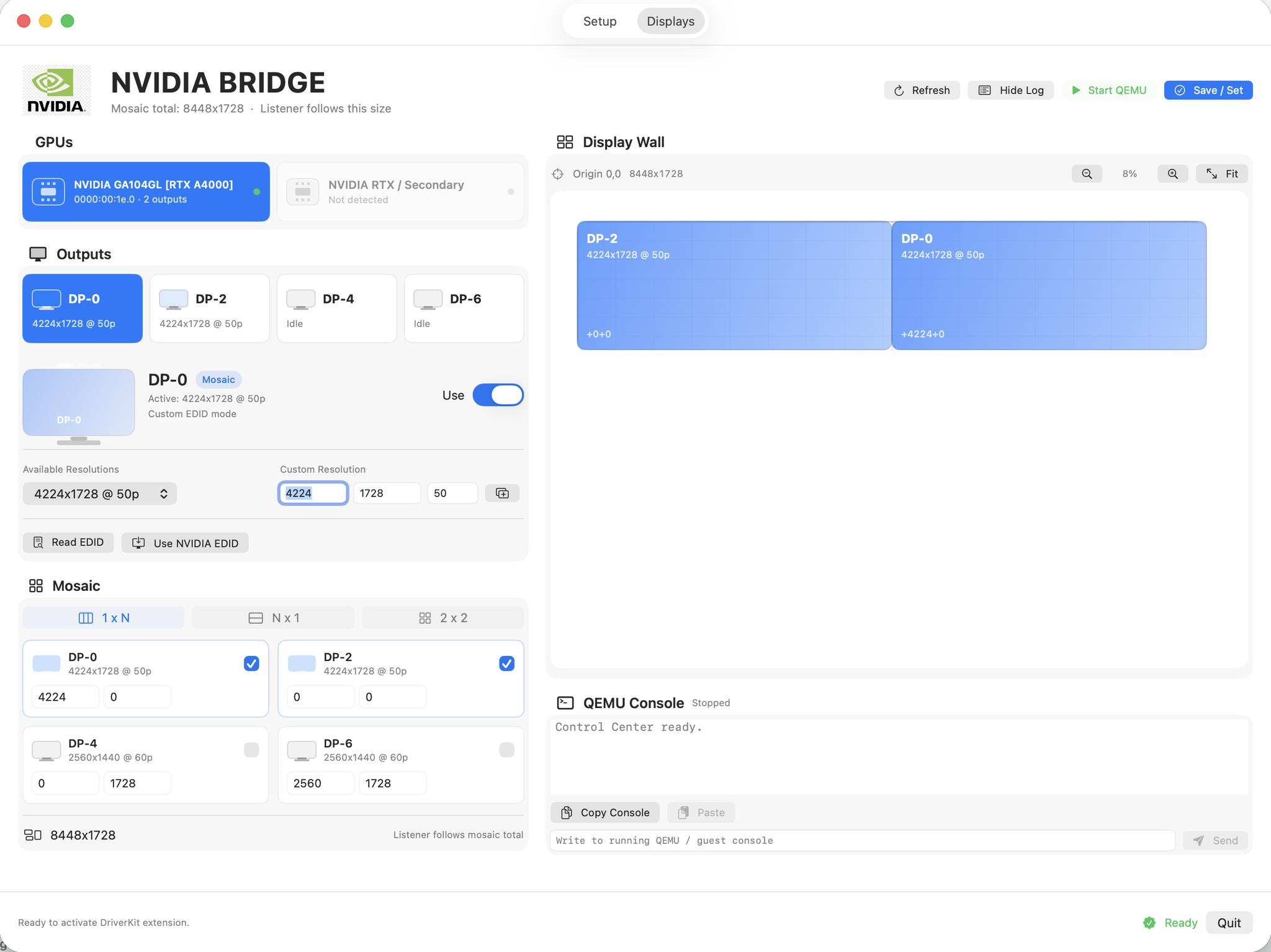
Yes, custom resolutions work perfectly.
Need an NVIDIA Mosaic setup at 8448×1728?
No problem.
We already integrated NVIDIA Quadro EDID handling, custom timings, Mosaic management, and output lock directly into the workflow.
Building Pro AV workflows on Apple Silicon?
Talk to us